
工作坊系列
- 工作坊 1:使用 Kiro 建置:他加祿語 學習 App 的提示優先產品設計工作坊
- 工作坊 2:使用 Kiro 建置:他加祿語 學習 App 的教育優先開發技巧工作坊
- 工作坊 3:使用 Kiro 建置:他加祿語 學習 App 的深入開發流程工作坊
- 工作坊 4:使用 Kiro 建置:將 他加祿語 學習 App 在地化為中文變體工作坊
- 工作坊 5:使用 Kiro 建置:他加祿語 卡片的文法與發音補強管線工作坊
- 工作坊 6:使用 Kiro 建置:他加祿語 學習 App 中可審查的獨特額外例句工作坊
- 工作坊 7:與 Kiro 一起開發:重建 CME Direct 風格的量化損益排行榜 UI
- 工作坊 8:與 Kiro 一起開發:重建損益排行榜背後的量化分析引擎
- 工作坊 9:與 Kiro 一起建構:適用於量化排行榜的 AWS AI 驅動交易台助理
對象: 想建立端到端 AI 輔助工程流程的專業開發者
時間: 2 小時
主要 AWS AI 服務: Kiro
專案輸出: 一個可重現的靜態網站產生器,可將句庫擴充為 他加祿語 學習卡、輸出 HTML、驗證結果並封裝發布成品。
工作坊摘要
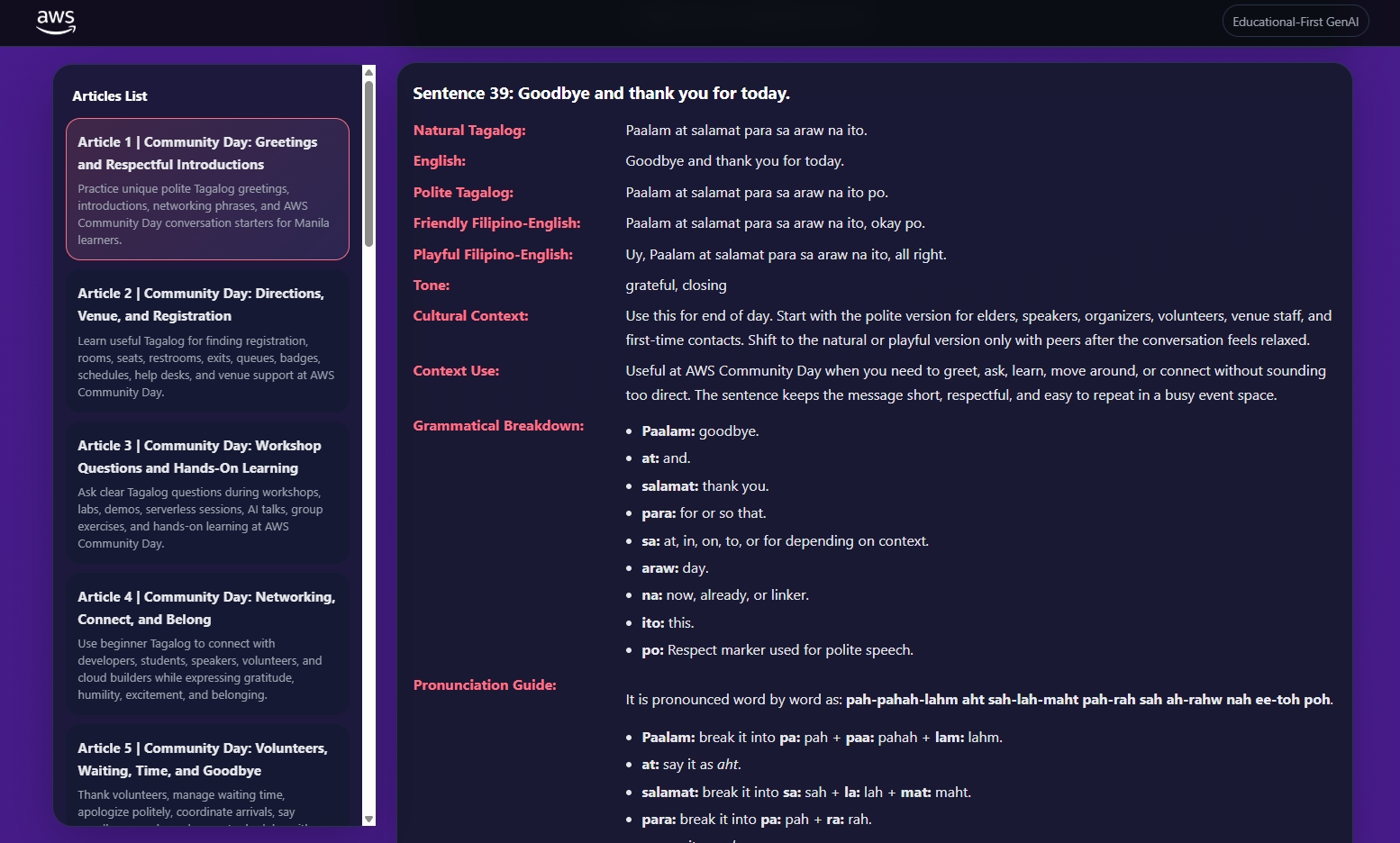
本工作坊帶領開發者完成 他加祿語 學習網站的檔案優先建置管線。參與者會使用 Kiro 定義指導文件、建立文章資料模型、擴充句庫、產生輔助內容、輸出靜態 HTML、驗證結果並封裝發布。重點是可重複的工程流程,讓結構化資料與檢查機制使產生的學習教材可預測、可追蹤,並能交付審查者。
工作坊目標
本工作坊聚焦開發流程。開發者會建置檔案優先的內容管線:文章中繼資料、句庫、情境擴充、文法輔助函式、發音輔助函式、HTML 呈現、驗證檢查與發布封裝。Kiro 會用於指導文件、規格、任務規劃、實作支援、測試產生、hook、文件與發布審查。
2 小時議程
| 時間 | 模組 | 開發者成果 |
|---|---|---|
| 0–10 分鐘 | Kiro 工作區 | 已準備指導文件與規格資料夾 |
| 10–25 分鐘 | 內容合約 | 已設計文章與句庫結構描述 |
| 25–45 分鐘 | 可重現的擴充 | 10 個基礎短句擴充為 40 張卡片 |
| 45–65 分鐘 | 輔助函式 | 已加入文法與發音輔助函式 |
| 65–90 分鐘 | 靜態呈現 | 已從結構化資料產生 HTML 頁面 |
| 90–105 分鐘 | 驗證 | 已加入卡片數量、摘要與禁止參照檢查 |
| 105–115 分鐘 | 封裝 | 已建立 ZIP 成品 |
| 115–120 分鐘 | 審查 | 已產生 Kiro 輔助發布檢查清單 |
步驟 1 — 為檔案優先產生器建立 Kiro 指導文件
Kiro 提示範例
請為檔案優先的靜態網站產生器建立 Kiro 指導文件。
產品是一個用於 AWS Manila Community Day 的 他加祿語 學習 App。
使用 Python 進行可重現的產生、HTML 輸出、CSS 與 ZIP 封裝。
單一事實來源是結構化資料,而不是手寫頁面。
每個產生出的頁面都必須在發布前完成驗證。
系統設計決策
- 檔案優先架構:這個工作坊不需要執行期後端。技術目標是示範如何把少量來源資料轉換成大型且一致的學習網站。檔案優先產生讓每個建置步驟都看得見、可檢查,也容易說明。
- 以可重現產生取代隨機輸出:AI 可以協助草稿與程式碼,但發布出的建置結果應該可重現。給定相同的句庫與情境,產生器應輸出相同的卡片與檔案,讓審查、測試與除錯都變得實際可行。
- 把驗證當成產品功能:產生出的網站可能看起來完整,卻藏著缺漏卡片或壞掉的行動版規則。建置驗證是系統設計的一部分,而不是事後補上的步驟。發布成品應包含證據,證明必要條件已被檢查。
程式碼範例 — .kiro/steering/static-generator.md
# 靜態產生器指引

本專案會從結構化 Python 資料產生 他加祿語 學習網站。
當 renderer 可以產生頁面時,不要手寫最終頁面。

## 規則

- 文章中繼資料控制導覽與檔名。
- 句庫是精簡的來源資料。
- 情境擴充會以可重現的方式建立重複練習卡片。
- HTML 輸出必須 escape 產生出的文字。
- 每篇文章必須剛好有 40 張卡片。
- 發布檢查必須在產生後、封裝前執行。
- 產生出的語言內容在正式使用前需要母語人士審查。
程式碼說明
- 商業邏輯:指導文件定義產生器的核心原則:結構化資料、可重現輸出與發布檢查。
- 程式碼邏輯:Kiro 會在產生 Python 函式、驗證檢查與發布任務時參考這份 Markdown 指引。
- 預期結果:Kiro 的建議應偏向可重用的 renderer 與檢查機制,而不是手動複製 HTML。
步驟 2 — 為管線產生 Kiro 規格
Kiro 提示範例
請建立一份名為 他加祿語-static-generator 的規格。
功能:從中繼資料與句庫產生文章頁面。
包含需求、設計、資料流與實作任務。
驗收條件:每篇文章都有 40 張卡片、HTML 會 escape 內容、具備行動版 CSS,且發布 ZIP 包含產生出的頁面。
系統設計決策
- 規格描述管線,而不只是 UI:主要工程價值在於把來源資料轉換成發布成品。規格應涵蓋資料、擴充、呈現、驗證與封裝,讓開發者理解整個系統。
- 驗收條件會變成發布檢查:「剛好 40 張卡片」和「具備行動版 CSS」不是主觀判斷,而是可以計數與測試的條件。這讓發布流程透明,也適合工作坊操作。
- 可追蹤的任務:Kiro 任務會把管線拆成可管理的實作單元。在真實團隊中,專業開發者可以獨立分派、審查或自動化每項任務。
程式碼範例 — .kiro/specs/他加祿語-static-generator/design.md
# 設計

## 資料流

1. 文章中繼資料定義頁面識別、slug、標題、分類與摘要。
2. 句庫定義精簡的短語 tuple。
3. 情境陣列把每個 tuple 擴充成多張學習卡片。
4. 輔助函式附加文法、例句與發音。
5. Renderer 建立已 escape 的靜態 HTML。
6. Validator 檢查卡片數量、行動版 CSS 標記、摘要字數與禁止的內部參照。
7. Packager 寫出 ZIP 成品。

## 主要模組

- `content.py`:來源文章中繼資料與句庫
- `expand.py`:可重現的卡片擴充
- `helpers.py`:文法、例句、發音
- `render.py`:HTML 呈現
- `validate.py`:發布檢查
- `build.py`:協調產生與封裝
程式碼說明
- 商業邏輯:這份設計展示如何把文化學習目標轉換成可重複執行的建置系統。
- 程式碼邏輯:每個模組都有單一職責,讓 Kiro 產生的實作更容易審查。
- 預期結果:開發者可以用小步驟實作產生器,並驗證每個階段。
步驟 3 — 建立文章中繼資料與句庫模型
Kiro 提示範例
請為靜態 他加祿語 學習網站建立 Python 來源資料。
文章中繼資料需包含 id、slug、title、category,以及 20 個英文單字的 summary。
建立精簡句庫,欄位包含 English、natural 他加祿語、polite 他加祿語、friendly Filipino-English、playful Filipino-English 與 tone。
系統設計決策
- 把中繼資料當成路由合約:文章中繼資料控制檔名、導覽、頁面標題與摘要。把中繼資料視為合約,可以避免頁面漂移,也讓網站容易重新產生。
- 精簡 tuple 來源資料:句庫儲存最小的已審查短語單位。產生器會圍繞穩定的基礎短語擴充情境,而不是為每張卡片發明全新輸出。
- 在來源資料中保留語氣變體:每個基礎短語都包含自然、禮貌、友善與玩笑版本。這確保 renderer 永遠能並排顯示語氣比較,而不需要猜測。
程式碼範例 — content.py
ARTICLES = [
    {
        "id": 1,
        "slug": "community-greetings-introductions",
        "title": "Community Day: Greetings and Respectful Introductions",
        "category": "Community Day",
        "summary": "Practice polite greetings names beginner phrases and warm introductions for meeting speakers volunteers students and builders in Manila with confidence today"
    }
]

SENTENCE_BANKS = {
    1: [
        (
            "Hello, I am learning 他加祿語.",
            "Kumusta, nag-aaral ako ng 他加祿語.",
            "Kumusta po, nag-aaral po ako ng 他加祿語.",
            "Hello po, learning 他加祿語 ako.",
            "Kumusta, learning 他加祿語 na ako, all right.",
            "friendly beginner introduction"
        ),
        (
            "May I ask a question?",
            "Puwede ba akong magtanong?",
            "Puwede po ba akong magtanong?",
            "Can I ask po?",
            "Question time na ako, all right?",
            "polite workshop request"
        )
    ]
}

CONTEXTS = [
    ("at morning registration", "sa morning registration"),
    ("before a workshop starts", "bago magsimula ang workshop"),
    ("while meeting a volunteer", "habang may nakikilalang volunteer"),
    ("after a session", "pagkatapos ng session")
]
程式碼說明
- 商業邏輯:資料定義網站要教什麼,以及頁面如何被識別。
- 程式碼邏輯:
ARTICLES儲存頁面中繼資料。SENTENCE_BANKS把文章 ID 對應到短語 tuple。CONTEXTS提供可重現的擴充情境。 - 預期結果:其他模組可以產生頁面與卡片,而不需要把內容硬寫在 render 函式裡。
步驟 4 — 將基礎短語擴充成卡片
Kiro 提示範例
請建立一個 Python 函式,把每個基礎短語擴充成具備情境的卡片。
每張卡片都必須有 number、background、English、natural、polite、friendly、playful、tone 與 context 欄位。
必要時重複使用情境,並裁切超出的內容,確保每篇文章剛好回傳 40 張卡片。
系統設計決策
- 受控擴充:產生器擴充的是情境,不是意義。保持基礎句子穩定,可以幫助學習者記住說法,同時看見不同活動情境。
- 固定數量讓頁面可預測:文章合約規定每頁有 40 張卡片。固定數量讓版面、審查工作量與發布驗證都更可預測。
- 發布建置不使用隨機性:隨機產生會讓審查變困難。可重現的迴圈確保 bug 回報可以用相同輸入資料重現。
程式碼範例 — expand.py
from itertools import cycle
from content import CONTEXTS


def expand_cards(base_sentences, article_id, target_count=40):
    cards = []
    context_cycle = cycle(CONTEXTS)

    while len(cards) < target_count:
        for sentence in base_sentences:
            if len(cards) >= target_count:
                break

            english, natural, polite, friendly, playful, tone = sentence
            context_en, context_tl = next(context_cycle)

            cards.append({
                "num": len(cards) + 1,
                "background": f"在 {context_en} 使用這個句子。它能支援尊重且合宜的活動溝通。",
                "english": english,
                "natural": natural,
                "polite": polite,
                "friendly": friendly,
                "playful": playful,
                "tone": tone,
                "context_en": context_en,
                "context_tl": context_tl,
                "article_id": article_id
            })

    return cards
程式碼說明
- 商業邏輯:小型句庫會變成完整文章卡片組,同時保留已審查的短語文字。
- 程式碼邏輯:函式會循環使用情境與基礎句子,直到達到
target_count。每張卡片都會取得可重現的編號。 - 預期結果:呼叫
expand_cards(SENTENCE_BANKS[1], 1)會回傳剛好 40 個卡片 dictionary。
步驟 5 — 加入文法與發音輔助函式
Kiro 提示範例
請建立文法拆解與發音的輔助函式。
如果 English 提到 thank,請說明 Salamat 與 po。
如果 English 詢問 where,請說明 Saan 與 ang。
如果 English 詢問許可,請說明 Puwede、ba 與 magtanong。
回傳適合初學者的說明。
系統設計決策
- 以規則為基礎的補強:文法筆記應一致且可審查。簡單規則比不透明的執行期產生更容易檢查。
- 初學者優先的說明:開發者應避免塞入過多學術文法。輔助函式會回傳適合行動版卡片的短說明。
- 輔助函式把補強與呈現分離:Renderer 應負責顯示內容,而不是決定文法。輔助函式讓補強邏輯可測試、可重用。
程式碼範例 — helpers.py
def grammar_breakdown(card):
    english = card["english"].lower()
    natural = card["natural"].lower()

    if "thank" in english or "salamat" in natural:
        return [
            ("Salamat", "thank you"),
            ("po", "politeness marker"),
            ("sa", "for, in, at, or to depending on context")
        ]

    if "where" in english or natural.startswith("saan"):
        return [
            ("Saan", "where"),
            ("po", "polite marker for respectful questions"),
            ("ang", "focus marker before the place or thing")
        ]

    if "may i" in english or "question" in english:
        return [
            ("Puwede", "may or can"),
            ("ba", "question marker"),
            ("magtanong", "to ask")
        ]

    return [
        ("po", "polite marker used for respect"),
        ("ako", "I or me"),
        ("kayo", "polite or plural you")
    ]


def pronunciation_guide(他加祿語):
    if 他加祿語.startswith("Kumusta"):
        return "koo-MOOS-tah. Keep the greeting warm and clear."
    if 他加祿語.startswith("Puwede"):
        return "PWEH-deh poh bah AH-kong mag-tah-NONG. Make the question gentle."
    if 他加祿語.startswith("Saan"):
        return "SAH-ahn poh. Keep the question short and polite."
    return "Read vowels clearly: a as ah, e as eh, i as ee, o as oh, u as oo."
程式碼說明
- 商業邏輯:輔助函式會在翻譯之外加入教學價值。
- 程式碼邏輯:
grammar_breakdown會根據英文與 他加祿語 文字選擇初學者筆記。pronunciation_guide會回傳特定短語的指引或 fallback。 - 預期結果:每張產生出的卡片都能顯示文法與發音,而不需要為每張卡片手寫這些區塊。
步驟 6 — 安全地呈現靜態 HTML
Kiro 提示範例
請為文章頁面建立 Python HTML renderer。
Escape 所有產生出的文字。
呈現標題、摘要、分類、40 張句子卡片、文法拆解、發音與行動版 CSS。
系統設計決策
- HTML escaping 是必要條件:產生出的內容可能包含標點、撇號或非預期字元。Escaping 可以保護頁面結構,並避免意外的 markup injection。
- 所有文章共用一個 renderer:單一 renderer 可以避免版面漂移。如果卡片設計改變,開發者只要更新一個函式並重新產生網站。
- 為了工作坊簡化而內嵌 CSS:大型網站使用外部 CSS 較乾淨,但內嵌小型 style block 可讓工作坊成品更容易攜帶與檢查。
程式碼範例 — render.py
import html
from helpers import grammar_breakdown, pronunciation_guide


def render_card(card):
    grammar_items = "".join(
        f"<li><strong>{html.escape(term)}:</strong> {html.escape(meaning)}</li>"
        for term, meaning in grammar_breakdown(card)
    )

    return f"""
<article class="sentence-card">
  <h2>Sentence {card['num']}</h2>
  <p><strong>Background:</strong> {html.escape(card['background'])}</p>
  <p><strong>English:</strong> {html.escape(card['english'])}</p>
  <p><strong>Natural 他加祿語:</strong> <span lang="tl">{html.escape(card['natural'])}</span></p>
  <p><strong>Polite 他加祿語:</strong> <span lang="tl">{html.escape(card['polite'])}</span></p>
  <p><strong>Friendly Filipino-English:</strong> {html.escape(card['friendly'])}</p>
  <p><strong>Playful Filipino-English:</strong> {html.escape(card['playful'])} <span class="badge">Informal</span></p>
  <p><strong>Tone:</strong> {html.escape(card['tone'])}</p>
  <h3>Grammar breakdown</h3>
  <ul>{grammar_items}</ul>
  <h3>Pronunciation</h3>
  <p>{html.escape(pronunciation_guide(card['polite']))}</p>
</article>
"""


def render_article(article, cards):
    body = "\n".join(render_card(card) for card in cards)
    return f"""<!doctype html>
<html lang="en">
<head>
  <meta charset="utf-8">
  <meta name="viewport" content="width=device-width, initial-scale=1">
  <title>{html.escape(article['title'])}</title>
  <style>
    body {{ font-family: system-ui, sans-serif; margin: 0; padding: 1rem; line-height: 1.6; }}
    main {{ max-width: 960px; margin: auto; }}
    .sentence-card {{ border: 1px solid #d0d7de; border-radius: 16px; padding: 1rem; margin: 1rem 0; }}
    .badge {{ background: #fff3cd; color: #7a4d00; padding: .15rem .5rem; border-radius: 999px; font-size: .75rem; }}
    @media (max-width: 760px) {{ body {{ padding: .75rem; }} .sentence-card {{ padding: .85rem; }} }}
  </style>
</head>
<body>
  <main>
    <p>{html.escape(article['category'])}</p>
    <h1>{html.escape(article['title'])}</h1>
    <p>{html.escape(article['summary'])}</p>
    <p><strong>Review note:</strong> Generated language content requires native-speaker review before production use.</p>
    {body}
  </main>
</body>
</html>"""
程式碼說明
- 商業邏輯:Renderer 會把結構化學習卡片轉成可在瀏覽器開啟的課程頁面。
- 程式碼邏輯:
html.escape會保護所有動態文字。render_card處理卡片 markup,render_article則把卡片包成完整 HTML 文件。 - 預期結果:產生出的文章頁面會包含傳入 renderer 的卡片,並且在行動裝置上保持可讀。
步驟 7 — 驗證並封裝發布成品
Kiro 提示範例
請建立 Python 建置程式碼,用來產生文章 HTML、驗證每個頁面、印出 JSON 檢查結果,並寫出 ZIP 套件。
檢查項目:每個頁面都有 40 個 sentence-card 元素、具備行動版 CSS、摘要有 20 個英文單字,且沒有禁止的內部參照。
系統設計決策
- 以程式碼協調建置:專業工作坊應以可重複執行的建置收尾,而不是手動複製 demo。
build.py會以可執行形式記錄發布流程。 - 呈現後再驗證:檢查會針對產生出的 HTML 執行,因為那才是學習者會開啟的內容。只驗證來源資料可能漏掉 renderer 缺陷。
- 用 ZIP 成品方便分享:社群工作坊結束後,ZIP 檔很容易散布。封裝精確產生出的檔案,可以避免對部署或審查內容產生歧義。
程式碼範例 — build.py
import json
import re
import zipfile
from pathlib import Path

from content import ARTICLES, SENTENCE_BANKS
from expand import expand_cards
from render import render_article

OUT_DIR = Path("dist")
ZIP_NAME = "他加祿語-learning-static-site.zip"


def word_count(text):
    return len(re.findall(r"\b\w+\b", text))


def validate_page(path, article):
    text = path.read_text(encoding="utf-8")
    return {
        "file": path.name,
        "sentence_cards": text.count('class="sentence-card"'),
        "has_mobile_css": "@media (max-width: 760px)" in text,
        "summary_words": word_count(article["summary"]),
        "has_forbidden_internal_reference": bool(re.search(r"internal prompt|private instruction", text, re.I))
    }


def build():
    OUT_DIR.mkdir(exist_ok=True)
    checks = []

    for article in ARTICLES:
        cards = expand_cards(SENTENCE_BANKS[article["id"]], article["id"])
        html = render_article(article, cards)
        output_path = OUT_DIR / f"article-{article['id']}-{article['slug']}.html"
        output_path.write_text(html, encoding="utf-8")
        checks.append(validate_page(output_path, article))

    with zipfile.ZipFile(ZIP_NAME, "w", zipfile.ZIP_DEFLATED) as package:
        for html_file in sorted(OUT_DIR.glob("*.html")):
            package.write(html_file, arcname=html_file.name)

    print(json.dumps(checks, indent=2))

    failures = [
        check for check in checks
        if check["sentence_cards"] != 40
        or not check["has_mobile_css"]
        or check["summary_words"] != 20
        or check["has_forbidden_internal_reference"]
    ]

    if failures:
        raise SystemExit("Release validation failed")


if __name__ == "__main__":
    build()
程式碼說明
- 商業邏輯:建置腳本會建立可發布的靜態網站,並證明預期的學習結構確實存在。
- 程式碼邏輯:它會擴充卡片、呈現 HTML、驗證產生出的頁面、寫出 ZIP、印出 JSON 檢查結果,並在任何規則違反時讓建置失敗。
- 預期結果:執行
python build.py會建立dist/*.html、建立他加祿語-learning-static-site.zip、印出檢查結果,且只有在發布有效時才成功結束。
步驟 8 — 加入 Kiro 發布 hook 與最終審查
Kiro 提示範例
請建立一個用於發布衛生檢查的 Kiro hook。
當 build.py 或 content.py 變更時,執行 python build.py,摘要驗證輸出,並針對卡片數量、行動版 CSS、摘要字數或禁止參照的失敗項目建議修正方式。
系統設計決策
- 讓自動化靠近變更:建置驗證應在來源內容或建置邏輯變更時發生,而不只是在發布結尾。Kiro hook 讓回饋貼近開發者動作。
- 解釋失敗,而不只是失敗:當工具說明發布檢查為什麼失敗,並建議最小修正方式時,開發者學得更快。這對可能剛接觸 Kiro 或此程式碼庫的工作坊參與者特別有用。
- 把發布檢查清單當成文件:Hook 會變成「完成」定義的活文件,並為未來貢獻者保留團隊期待。
Kiro hook 範例 — .kiro/hooks/release-validation.md
# Hook:發布驗證

觸發條件:當 `build.py`、`content.py`、`expand.py`、`helpers.py` 或 `render.py` 變更時。
動作:
1. 執行 `python build.py`。
2. 讀取 JSON 驗證輸出。
3. 如果某個頁面少於或多於 40 張卡片,請說明哪篇文章失敗。
4. 如果缺少行動版 CSS,請建議在 `render.py` 還原 media query。
5. 如果摘要字數不是 20,請建議修正後的 20 個英文單字摘要。
6. 如果出現禁止的內部參照,請指出產生出的檔案並建議移除。
Hook 說明
- 商業邏輯:Hook 會保護產生出的學習網站,避免發布內容漂移。
- 程式碼邏輯:它會回應產生器檔案變更、執行建置、解讀 JSON 檢查結果,並建議有針對性的修正。
- 預期結果:開發者在分享靜態網站前,可以快速取得發布回饋。
完成檢查清單
- Kiro 指導文件描述檔案優先產生器規則。
- Kiro 規格描述資料流與任務。
- 已具備文章中繼資料與句庫。
- 擴充會回傳剛好 40 張卡片。
- 文法與發音輔助函式可運作。
- Renderer 會 escape 產生出的文字。
- 建置腳本會驗證產生出的 HTML。
- 已建立 ZIP 套件。
- 已具備 Kiro 發布 hook 指引。
工作坊後的選用 AWS 延伸
- 將 ZIP 內容上傳到 Amazon S3 靜態網站託管。
- 在靜態網站前方放置 Amazon CloudFront。
- 將來源 JSON 儲存在已啟用版本控制的 S3。
- 在 CI/CD 中使用 Kiro CLI,於 pull request 期間執行產生器檢查。
額外動手開發實驗
這些實驗是 工作坊 3 — 深入開發流程 專屬內容。它們會擴充 Python 靜態網站產生器,加入可重現的建置操作、來源追溯、發布 manifest、審查者 bundle 與管線測試。重點是產生器工程,而不是 React App 行為。
動手實驗 A — 加入建置 manifest 以提供發布來源追溯
開發者操作
- 請 Kiro 建立發布 manifest 格式。
- 每次建置後產生
dist/manifest.json。 - 包含文章數量、產生出的檔案、卡片數量、建置時間戳記與驗證摘要。
- 加入 validator 檢查:如果 manifest 缺少預期檔案,就讓建置失敗。
Kiro 提示範例
請在 Python 靜態產生器中加入建置 manifest。
頁面呈現完成後,寫出 dist/manifest.json,內容包含產生出的檔名、文章 ID、卡片數量、驗證檢查與建置時間戳記。
除了時間戳記之外,manifest 應該可重現。
加入驗證,確認每個產生出的 HTML 頁面都出現在 manifest 中。
系統設計決策
- 發布來源追溯很重要:當 ZIP 成品包含機器可讀的產生內容描述時,審查會更容易。
- Manifest 補足驗證:驗證說明建置是否通過,manifest 則記錄實際建置了什麼。
- 對審查者友善的成品:審查者不需要打開每個 HTML 頁面,也能檢查檔名與數量。
程式碼範例 — manifest.py
from datetime import datetime, timezone
import json
from pathlib import Path


def write_manifest(output_dir: Path, articles: list[dict], checks: list[dict]) -> Path:
    html_files = sorted(path.name for path in output_dir.glob("*.html"))
    manifest = {
        "generatedAt": datetime.now(timezone.utc).isoformat(),
        "articleCount": len(articles),
        "files": html_files,
        "checks": checks,
        "cardCounts": {
            check["file"]: check["sentence_cards"]
            for check in checks
        }
    }
    manifest_path = output_dir / "manifest.json"
    manifest_path.write_text(json.dumps(manifest, indent=2), encoding="utf-8")
    return manifest_path
程式碼說明
- 商業邏輯:Manifest 會為審查者與未來維護者記錄產生出的發布內容。
- 程式碼邏輯:函式會掃描產生出的 HTML 檔案、記錄驗證輸出,並把 JSON 寫入輸出目錄。
- 預期結果:每次建置都會在產生出的頁面旁建立
dist/manifest.json。
動手實驗 B — 加入可重現的卡片 ID 與 slug 衝突檢查
開發者操作
- 請 Kiro 用穩定 ID 取代只有數字的卡片識別。
- 從文章 ID、基礎句子索引與情境索引產生卡片 ID。
- 為文章中繼資料加入 slug 衝突檢查。
- 當出現重複卡片 ID 或重複 slug 時,讓建置失敗。
Kiro 提示範例
請為產生出的卡片建立可重現 ID。
使用 article id、source sentence index、context index 與 sequence number。
加入發布驗證,檢查重複 card id 與重複 article slug。
回傳清楚的錯誤訊息,指出衝突的記錄。
系統設計決策
- 穩定 ID 支援審查留言:母語審查者針對產生出的卡片留言時,需要穩定參照。
- 衝突檢查避免頁面被覆寫:重複 slug 可能導致某篇文章在
dist中覆寫另一篇文章。 - 可重現性支援迴歸測試:除非來源資料或擴充邏輯改變,否則 ID 不應改變。
程式碼範例 — identity.py
import re


def safe_slug(value: str) -> str:
    text = value.lower().strip()
    text = re.sub(r"[^a-z0-9]+", "-", text)
    return text.strip("-")


def card_id(article_id: int, sentence_index: int, context_index: int, sequence: int) -> str:
    return f"a{article_id:03d}-s{sentence_index:02d}-c{context_index:02d}-n{sequence:03d}"


def assert_unique(values: list[str], label: str) -> None:
    seen: set[str] = set()
    duplicates: set[str] = set()
    for value in values:
        if value in seen:
            duplicates.add(value)
        seen.add(value)
    if duplicates:
        joined = ", ".join(sorted(duplicates))
        raise ValueError(f"Duplicate {label}: {joined}")
程式碼說明
- 商業邏輯:ID 與 slug 會成為穩定的審查與路由合約。
- 程式碼邏輯:
card_id產生可重現 ID;assert_unique會在發現重複時快速失敗。 - 預期結果:審查者可以引用卡片 ID,而產生器會拒絕含糊的文章輸出。
動手實驗 C — 建立增量建置快取以加快迭代
開發者操作
- 請 Kiro 為每篇文章的來源資料計算內容 hash。
- 將 hash 儲存在
.build-cache.json。 - 除非提供
--force,否則略過未變更文章的呈現。 - 印出哪些文章已建置、已略過或驗證失敗。
Kiro 提示範例
請為靜態產生器加入增量建置行為。
針對每篇文章 hash 文章中繼資料、句庫與情境。
將 hash 儲存在 .build-cache.json。
除非使用 --force,否則略過未變更的文章。
封裝前一律對既有輸出執行驗證。
系統設計決策
- 讓內容量大的建置有快速回饋:大型產生式網站不應在只有一篇文章變更時重新呈現每個頁面。
- 快取來源輸入,而不是輸出時間戳記:Hash 來源資料讓重建決策可重現且可攜。
- 驗證仍然要執行:略過呈現不應略過發布檢查,因為既有輸出仍可能無效或遺失。
程式碼範例 — cache.py
import hashlib
import json
from pathlib import Path
from typing import Any

CACHE_FILE = Path(".build-cache.json")


def stable_hash(value: Any) -> str:
    payload = json.dumps(value, sort_keys=True, ensure_ascii=False)
    return hashlib.sha256(payload.encode("utf-8")).hexdigest()


def read_cache() -> dict[str, str]:
    if not CACHE_FILE.exists():
        return {}
    return json.loads(CACHE_FILE.read_text(encoding="utf-8"))


def write_cache(cache: dict[str, str]) -> None:
    CACHE_FILE.write_text(json.dumps(cache, indent=2), encoding="utf-8")


def should_build(cache: dict[str, str], article_id: int, source_hash: str, force: bool = False) -> bool:
    return force or cache.get(str(article_id)) != source_hash
程式碼說明
- 商業邏輯:快取可以減少等待時間,同時保持建置可重現。
- 程式碼邏輯:使用排序 key 的 JSON 序列化,為來源輸入建立穩定 hash。
- 預期結果:重新執行建置時會略過未變更文章,但仍會驗證發布內容。
動手實驗 D — 為母語人士審查產生審查者 bundle
開發者操作
- 請 Kiro 將產生出的卡片匯出成審查者可用的 CSV。
- 包含卡片 ID、文章標題、英文、自然 他加祿語、禮貌 他加祿語、玩笑版本、語氣與情境。
- 加入留白的 reviewer-notes 欄位。
- 把 CSV 與產生出的 HTML 一起封裝進發布 ZIP。
Kiro 提示範例
請為產生出的 他加祿語 卡片建立審查者 CSV 匯出。
每列應包含穩定 card id、文章標題、情境、English、natural 他加祿語、polite 他加祿語、friendly Filipino-English、playful Filipino-English、tone 與 reviewerNotes。
將檔案寫入 dist/reviewer-cards.csv,並把它包含在 ZIP 套件中。
系統設計決策
- 審查者需要表格式工作流程:母語人士審查通常在試算表中比在產生出的 HTML 裡更有效率。
- 穩定 ID 連結審查與輸出:CSV 必須包含與產生頁面中相同的卡片 ID。
- 留白的審查者備註保留人的決策權:產生器準備審查結構,但不代替人做核准決定。
程式碼範例 — review_export.py
import csv
from pathlib import Path


def write_reviewer_csv(output_path: Path, article: dict, cards: list[dict]) -> None:
    fieldnames = [
        "cardId",
        "articleTitle",
        "context",
        "english",
        "naturalTagalog",
        "politeTagalog",
        "friendlyFilipinoEnglish",
        "playfulFilipinoEnglish",
        "tone",
        "reviewerNotes"
    ]
    with output_path.open("w", newline="", encoding="utf-8") as file:
        writer = csv.DictWriter(file, fieldnames=fieldnames)
        writer.writeheader()
        for card in cards:
            writer.writerow({
                "cardId": card["id"],
                "articleTitle": article["title"],
                "context": card["context_en"],
                "english": card["english"],
                "naturalTagalog": card["natural"],
                "politeTagalog": card["polite"],
                "friendlyFilipinoEnglish": card["friendly"],
                "playfulFilipinoEnglish": card["playful"],
                "tone": card["tone"],
                "reviewerNotes": ""
            })
程式碼說明
- 商業邏輯:匯出功能會把產生出的學習卡片轉成可審查的成品。
- 程式碼邏輯:
csv.DictWriter寫出一致欄位,並保留 UTF-8 他加祿語 文字。 - 預期結果:審查者會收到一份能直接對應回產生 HTML 卡片的 CSV。
動手實驗 E — 使用 pytest 加入管線合約測試
開發者操作
- 請 Kiro 為產生器合約建立測試。
- 測試精確卡片數量、重複 ID 失敗、escaped HTML、manifest 建立與審查者 CSV 欄位。
- 修改產生邏輯後,在本機執行
pytest。 - 請 Kiro 解釋失敗測試,並提出最小修正方式。
Kiro 提示範例
請為靜態網站產生器管線產生 pytest 測試。
測試擴充數量、可重現 card ids、HTML escaping、manifest 檔案建立與審查者 CSV headers。
可行時使用小型記憶體內 sample data。
除非必要,避免使用完整 HTML snapshot。
系統設計決策
- 管線合約保護發布行為:產生器的風險比單一函式更高,因為資料會流經擴充、呈現、驗證、manifest 與封裝。
- 小型測試更容易診斷:測試應驗證關鍵合約,而不是比較龐大的產生頁面。
- Escaping 是不可妥協的要求:Renderer 測試必須包含不安全字元,才能及早抓到 escaping 退化。
程式碼範例 — tests/test_pipeline_contracts.py
import json
from pathlib import Path
from identity import assert_unique, card_id
from manifest import write_manifest
from render import render_article
def test_card_id_is_deterministic():
assert card_id(1, 2, 3, 4) == "a001-s02-c03-n004"
def test_duplicate_detection_fails_fast():
try:
assert_unique(["intro", "intro"], "slug")
except ValueError as error:
assert "Duplicate slug" in str(error)
else:
raise AssertionError("Expected duplicate slug failure")
def test_render_article_escapes_title():
article = {"title": "Hello <他加祿語>", "category": "Test", "summary": "one two three"}
html = render_article(article, [])
assert "Hello <他加祿語>" in html
def test_manifest_records_generated_files(tmp_path: Path):
(tmp_path / "article-1-demo.html").write_text("<html></html>", encoding="utf-8")
manifest_path = write_manifest(tmp_path, [{"id": 1}], [{"file": "article-1-demo.html", "sentence_cards": 40}])
manifest = json.loads(manifest_path.read_text(encoding="utf-8"))
assert manifest["articleCount"] == 1
assert "article-1-demo.html" in manifest["files"]
程式碼說明
- 商業邏輯:測試會保護穩定識別、安全呈現與發布文件。
- 程式碼邏輯:每個測試都用最少 fixture data 檢查一個小合約。
- 預期結果:重要的產生器承諾被測試涵蓋後,管線變更會更安全。
動手實驗 F — 加入 dry-run 發布模式與成品 checksum
開發者操作
- 請 Kiro 在建置命令中加入
--dry-run。 - 在 dry-run 模式中,產生驗證輸出但不寫出 ZIP。
- 在一般模式中,為 ZIP 與 manifest 計算 SHA-256 checksum。
- 為維護者印出最終發布摘要。
Kiro 提示範例
請在 Python 建置流程中加入 dry-run 發布模式與成品 checksum。
--dry-run 應呈現並驗證,但略過 ZIP 寫入。
一般發布應為 ZIP 檔與 manifest.json 寫出 checksum。
印出精簡發布摘要,包含檔案、檢查結果與 checksum 路徑。
系統設計決策
- Dry-run 降低發布風險:維護者可以驗證候選建置,而不建立或覆寫成品。
- Checksum 支援成品完整性:Checksum 讓審查者確認分享出去的 ZIP,就是通過驗證的同一份成品。
- 發布摘要改善交接:建置輸出應清楚告訴維護者發生了什麼,以及到哪裡找證據。
程式碼範例 — checksums.py
import hashlib
from pathlib import Path


def sha256_file(path: Path) -> str:
    digest = hashlib.sha256()
    with path.open("rb") as file:
        for chunk in iter(lambda: file.read(1024 * 1024), b""):
            digest.update(chunk)
    return digest.hexdigest()


def write_checksum(path: Path) -> Path:
    checksum = sha256_file(path)
    checksum_path = path.with_suffix(path.suffix + ".sha256")
    checksum_path.write_text(f"{checksum}  {path.name}\n", encoding="utf-8")
    return checksum_path
程式碼說明
- 商業邏輯:Checksum 讓產生出的發布內容更容易驗證與分享。
- 程式碼邏輯:函式會以 chunk 串流讀取檔案,並寫出標準
.sha256sidecar 檔。 - 預期結果:一般發布會產生 ZIP 與 manifest checksum,而 dry-run 只驗證不封裝。
參考架構備註
- 本工作坊強調的 Kiro 能力:檔案優先管線規劃、可重現的 Python 產生、發布驗證、成品封裝、來源追溯文件、管線測試與建置審查自動化。
- 產品範圍:產生 他加祿語 學習頁面,用於審查與後續靜態託管。在 他加祿語 母語人士審查前,語言內容都仍屬草稿。
- 執行期範圍:優先產生靜態 HTML。發布成品通過驗證後,可選擇使用 Amazon S3 靜態網站託管、Amazon CloudFront 或 AWS Amplify Hosting 部署到 AWS。